> For the complete documentation index, see [llms.txt](https://docs.biswap.org/biswap/llms.txt). Markdown versions of documentation pages are available by appending `.md` to page URLs; this page is available as [Markdown](https://docs.biswap.org/biswap/core-products/voting-2.0/guide-to-voting-2.0-and-proposal-creation.md).
# Guide to Voting 2.0 & Proposal Creation
## How to Vote?
The voting process is quite similar to the previous voting system on Biswap. But now, instead of BSW tokens, you must have vBSW points, which are given by staking your BSW tokens to the [BSW Investment Pool](https://biswap.org/investment_pool?utm_source=blog\&utm_medium=social\&utm_campaign=voting_upgrade_SMM) or [BSW Classic Pool](https://biswap.org/pools/stake_bsw).
* Voting is possible while the proposal is in the "**Vote Now**" state.
{% hint style="warning" %}
**Pay attention**: the Biswap team reserves the right to change the required minimal amount of vBSW to correspond to the market conditions or projects strategic needs.
{% endhint %}
## How to Create a Proposal?
First of all, to create a voting proposal you must have the required amount of vBSW.
* 70 000 vBSW - the required minimal vBSW to create proposals.
Then you should carefully consider, and competently describe your offer and place it following a few simple steps described below.\
\
**Step** **1.** Go to the [Voting Page](https://biswap.org/votings) and check if you have enough vBSW to create a voting proposal.
**Step** **2**. If you have 70 000 or more vBSW, click ‘**Make a proposal**’ and you will be redirected to the creation page.
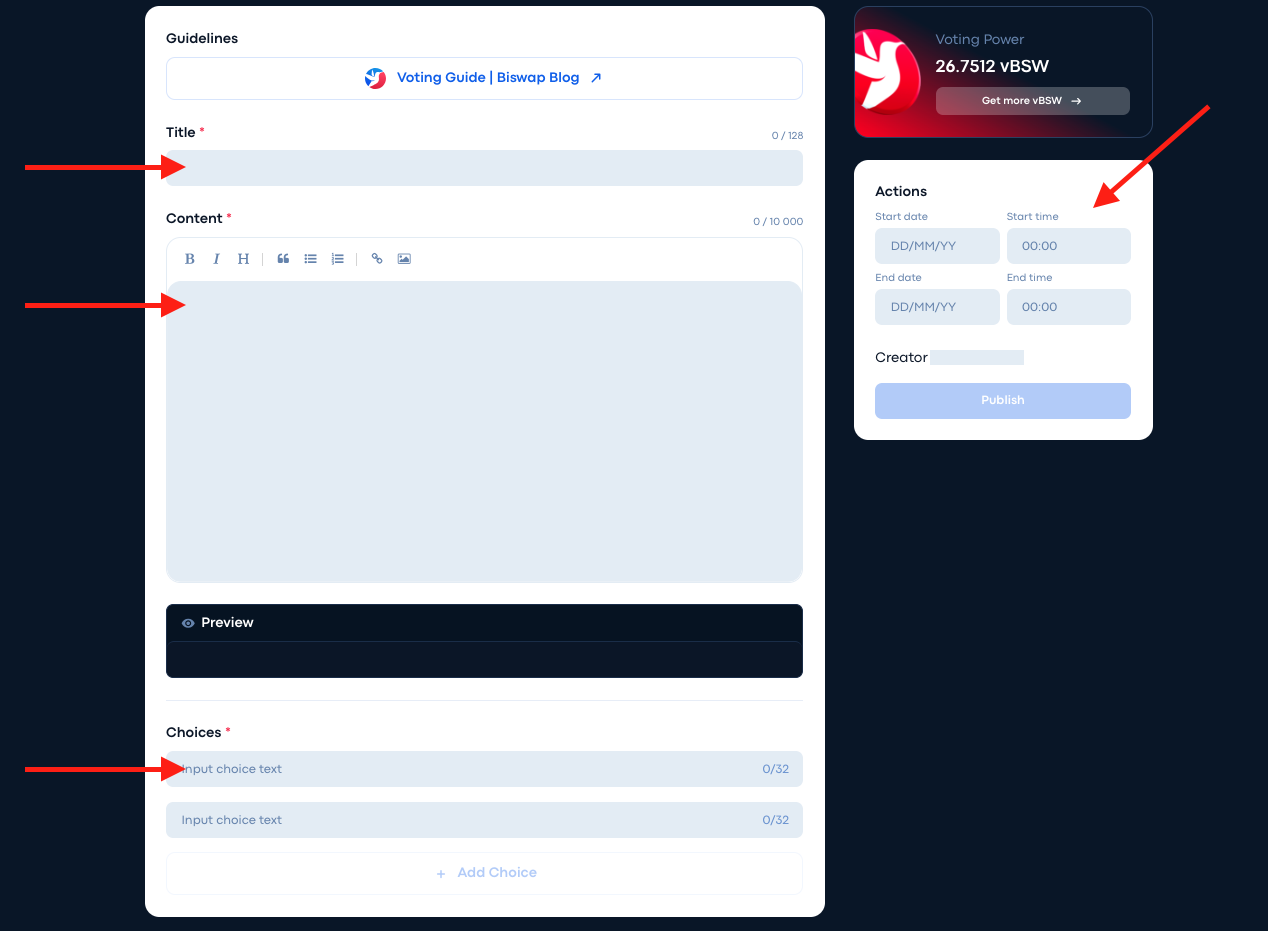
**Step** **3**. There you will see 4 fields that must be filled in: *Title*, *Content*, *Choices* and *Time*.
**Step 4.** Then, you have to fill all the fields step by step.
Note that in the "Content" section, you can outline your proposal using different text formatting options such as: ‘Headings’, ‘Bold’, ‘Italics’, ‘Bullet List’, ’‘Hyperlink’, ‘Add an Image’, etc.
Also see how your proposal will look like on the site in the "Preview" box.
**Step 5.** Once you have titled and outlined your proposal, you need to specify the options for Choices.
The team recommends using the following voting options for convenience:
* **Yes** - in favor of this proposal;
* **No** - against this proposal;
* **Abstain** - neither in favor nor against.
**Step 6.** Last but not least, you need to specify the duration of your voting.
{% hint style="danger" %}
Remember that it cannot be longer than 7 days, otherwise the proposal will be deleted without warning.
{% endhint %}
Once you have filled in the start and end dates, the "**Publish**" button will become active. Click it and congratulations, you're done! All that's left is to wait for the results.
### Quorum
In order for a vote to be considered successful, it must reach a quorum of **1 500 000 vBSW** who have voted for any given proposal. The purpose of a quorum is to ensure that only those proposals deemed successful have adequate voter participation.
### Result
A Community Voting can be considered successful if a quorum is reached and more than 50% of the votes are cast for one of the options. A completed Community Voting is a temperature check, so its content is not binding. Community Votings are used to propose ideas and show the community's point of view. The Biswap team reviews each successfully completed Community Voting and may select the best ideas for future product releases and/or Core Voting. The ideas must align with Biswap's vision and mission, and have a positive and sustainable impact on the development of the project in the industry.

 **Step** **3**. There you will see 4 fields that must be filled in: *Title*, *Content*, *Choices* and *Time*.
 **Step 4.** Then, you have to fill all the fields step by step.
Note that in the "Content" section, you can outline your proposal using different text formatting options such as: ‘Headings’, ‘Bold’, ‘Italics’, ‘Bullet List’, ’‘Hyperlink’, ‘Add an Image’, etc.
Also see how your proposal will look like on the site in the "Preview" box.
**Step 4.** Then, you have to fill all the fields step by step.
Note that in the "Content" section, you can outline your proposal using different text formatting options such as: ‘Headings’, ‘Bold’, ‘Italics’, ‘Bullet List’, ’‘Hyperlink’, ‘Add an Image’, etc.
Also see how your proposal will look like on the site in the "Preview" box.
 **Step 5.** Once you have titled and outlined your proposal, you need to specify the options for Choices.
The team recommends using the following voting options for convenience:
* **Yes** - in favor of this proposal;
* **No** - against this proposal;
* **Abstain** - neither in favor nor against.
**Step 5.** Once you have titled and outlined your proposal, you need to specify the options for Choices.
The team recommends using the following voting options for convenience:
* **Yes** - in favor of this proposal;
* **No** - against this proposal;
* **Abstain** - neither in favor nor against.
 **Step 6.** Last but not least, you need to specify the duration of your voting.
{% hint style="danger" %}
Remember that it cannot be longer than 7 days, otherwise the proposal will be deleted without warning.
{% endhint %}
**Step 6.** Last but not least, you need to specify the duration of your voting.
{% hint style="danger" %}
Remember that it cannot be longer than 7 days, otherwise the proposal will be deleted without warning.
{% endhint %}